

XSS (Cross-Site Scripting) vulnerabilities are among the longest-standing vulnerabilities in web applications. Depending on the context, an XSS vulnerability can lead to session hijacking, credential theft, account takeover, the exposure of sensitive data, or even the compromise of administration interfaces.
In this article, we outline the principles and mechanics of XSS vulnerabilities. We also detail the different types of XSS attacks, injection contexts, DOM-specific mechanisms, exploitation scenarios, and a research methodology that can be used during a penetration test. Finally, we present prevention mechanisms and a defence-in-depth approach to prevent XSS vulnerabilities.
Comprehensive Guide to XSS (Cross-Site Scripting) Vulnerabilities
- What is an XSS (Cross-Site Scripting) Vulnerability?
- How Does an XSS Work?
- Understanding XSS Injection Contexts
- Injection into HTML content
- Injection into an HTML attribute
- Dangerous attributes and separation between data and code
- Injection into a JavaScript string
- Single and double quotes, and template literals
- JSON data embedded in a page
- URL injection
- Injection in a CSS context
- SVG, MathML and rich HTML content
- Injections across several successive contexts
- What are the Different Types of XSS Attacks?
- DOM-Based XSS: Understanding Sources and Sinks
- Mutation XSS and the complexity of HTML parsing
- How Do Attackers Exploit XSS Vulnerabilities?
- Methodology for Detecting XSS Vulnerabilities During a Penetration Test
- How To Prevent XSS Vulnerabilities?
- Encode at the time of output and according to the context
- Prioritise safe sinks
- Sanitise when HTML actually needs to be accepted
- Validate inputs when the format is known
- Avoid payload blocklists
- Retain frameworks' automatic safeguards
- Content Security Policy as a defence-in-depth strategy
- Trusted Types to reduce DOM XSS
- HttpOnly and minimising the impact
- SameSite and actual scope of protection
- Isolate sensitive interfaces and sources
- Maintain rendering and sanitisation libraries
- Conclusion
What is an XSS (Cross-Site Scripting) Vulnerability?
An XSS is a client-side injection vulnerability in which data controllable by an attacker is interpreted by the browser as active content, when it should have remained mere data.
Unlike an SQL injection, which generally aims to alter the query sent to a database engine, XSS primarily targets the browser. The browser is, however, a particularly sensitive environment: it hosts the application interface, the displayed data, session mechanisms and part of the logic used to interact with the backend.
When an injected script runs on the vulnerable application’s origin, it is subject to the same browser security rules as the legitimate JavaScript from that origin. Depending on the architecture, it can therefore read the DOM, access available JavaScript data, interact with certain client-side storage mechanisms and send requests to resources accessible from that session.
A classic example is as follows:
<script>alert(1)</script>This payload is useful for visually confirming whether JavaScript can be executed, but it does not reflect the actual impact. A thorough assessment then seeks to understand what the compromised browser can do in the victim’s specific context.
How Does an XSS Work?
Verifiable data, interpretation and output context
An XSS vulnerability typically arises when three conditions are met: an attacker controls some data, that data reaches a rendering point or a vulnerable sink, and the processing applied is not suited to the context in which it is interpreted.
Let’s take, for example, a simplified search function:
<p>Results for : <?php echo $_GET['q']; ?></p>With the query:
/search?q=computerFor example, the browser receives:
<p>Results for: computer</p>If the value of q contains markup and no output encoding is applied, the browser may render new elements instead of displaying a string of characters. The problem is therefore not that the value was ‘incorrect’ when it entered the application. The problem arises when it is used in a context where certain characters alter the expected syntax.
This principle is fundamental: data is not inherently secure simply because it comes from a database, an internal API or an already authenticated user. Security must be assessed at the point of use.
Role of the browser and the origin
In particular, the browser enforces the Same-Origin Policy to prevent a page from arbitrarily accessing data from another site. An XSS attack circumvents this trust model: the malicious code is not executed from an external site, but directly within the vulnerable origin.
This does not mean that it gains unlimited access to the workstation. Browser sandboxing, permissions, CSP (Content Security Policy) and other security mechanisms continue to apply. However, from the perspective of the affected application, the injected script is in a very advantageous position. It can often call the same APIs as the legitimate interface and act with the privileges of the user who triggered the payload.
This is also why CSRF protections often prove insufficient when an XSS vulnerability is present. They are designed to prevent a third-party site from triggering actions, not to deal with JavaScript executed within the trusted origin itself.
Understanding XSS Injection Contexts
Identifying the injection context is the most important step before constructing a payload. The browser does not interpret data placed within the HTML body, in an attribute, in a JavaScript string, in a URL or in a CSS fragment in the same way.
Characters with syntactic significance and the necessary protection mechanisms therefore differ depending on their position.
Injection into HTML content
The simplest example is that of data inserted between two tags:
<div class="result">
    USER_INPUT
</div>
A vulnerable implementation may be:
<div class="result">
    <?php echo $_GET['search']; ?>
</div>
If the following entry is left as it is:
<img src=x onerror=alert(1)>The browser creates a genuine HTML element and interprets its event handler. It is therefore not necessary to inject a <script> tag.
When the requirement is simply to display text, the value must be encoded for the HTML context.
In PHP, an implementation could, for example, be based on:
echo htmlspecialchars(
    $_GET['search'],
    ENT_QUOTES | ENT_SUBSTITUTE,
    'UTF-8'
);
The string is then rendered as text, without altering the document’s structure. This operation must be carried out at the time of rendering; it is generally preferable to retain the original data in storage rather than saving a version that has already been escaped for a specific context.
Injection into an HTML attribute
Let us now consider:
<input type="text" value="USER_INPUT">The data is enclosed in double quotes. If the quotes are not correctly encoded, a controlled value may close the attribute and introduce new ones.
An entry such as:
" autofocus onfocus="alert(1)can transform a vulnerable structure into:
<input type="text" value="" autofocus onfocus="alert(1)">The key point here is the absence of delimiters. A payload intended for the HTML body is therefore not necessarily suitable for an attribute.
It is also preferable to always enclose dynamic values in quotes. Attributes without delimiters give the parser more scope for interpretation and unnecessarily complicate security measures.
Dangerous attributes and separation between data and code
Not all attributes pose the same risk. Text data placed in title is not the same as data injected into onclick:
<button onclick="showProfile(“USER_INPUT”)">View profile</button>In this example, the application deliberately places data in the middle of a JavaScript context. Even a complex encoding system becomes vulnerable because multiple syntaxes are intertwined.
A safer design involves separating behaviour and data:
<button id="profileButton">View profile</button>and then to link the event from a static script:
document
  .getElementById('profileButton')
  .addEventListener('click', showProfile);
The general principle is simple: where an architectural approach makes it possible to avoid inserting an unreliable value directly into the code, this solution is generally preferable to attempting to filter it out.
Injection into a JavaScript string
A piece of data can be entered directly into a JavaScript block:
<script>
const username = 'USER_INPUT';
</script>
The relevant parser is no longer just the HTML parser. The browser must also interpret JavaScript syntax. Protection designed exclusively for the HTML body is therefore not sufficient.
You should avoid, as far as possible, constructing JavaScript code by concatenating it with untrusted data. When the server needs to send values to the client, these must be serialised using a mechanism designed to produce a valid data representation and embedded within a structure that prevents them from being taken out of their intended context.
In PHP, one approach, for example, is to use json_encode() with options suited to the HTML context rather than manually constructing a string:
<script>
const username = <?php echo json_encode(
    $username,
    JSON_HEX_TAG | JSON_HEX_AMP | JSON_HEX_APOS | JSON_HEX_QUOT
); ?>;
</script>
In modern architecture, it is often still preferable to load data via a JSON API or place it in a dedicated data store, and then keep the JavaScript code static.
Single and double quotes, and template literals
The following constructions use different structures:
const value1 = 'USER_INPUT';
const value2 = "USER_INPUT";
const value3 = `USER_INPUT`;
Template literals (strings) may, in particular, contain ${...} expressions. A filter designed solely to neutralise the apostrophe therefore does not protect a value that is reused with double quotes or backticks.
During an audit, the choice of delimiter forms part of the context to be identified. One should never infer the security of a field based on the behaviour observed in another representation of the same data.
JSON data embedded in a page
Many applications set an initial state within a <script> element:
<script>
window.initialData = {
  "username": "USER_INPUT"
};
</script>
The fact that the structure resembles JSON is not enough to make it secure. A genuine application/json response must be distinguished from a fragment of serialised data placed within an HTML document and a script element.
In the latter case, the rules of the enclosing document remain important. In particular, incorrect serialisation may result in sequences appearing that alter the HTML structure even before the JavaScript engine interprets the value.
URL injection
An application can create a link from a controllable value:
<a href="USER_INPUT">Continue</a>Two separate issues need to be addressed. Encoding prevents the data from breaking the attribute’s syntax; validation checks that the URL itself matches what the application accepts.
If the feature is only intended to generate HTTPS links to a list of approved domains, the policy must be explicitly checked. A string may be perfectly encoded from an HTML perspective whilst still being a functionally prohibited destination.
This distinction between encoding and validation is essential for dynamic links, redirects, callbacks and certain JavaScript APIs that manipulate URLs.
Injection in a CSS context
CSS injections are less commonly exploited as direct XSS in modern browsers than certain older techniques. They remain, however, important for understanding contextual reasoning.
Consider:
<style>
.profile {
  background-image: url('USER_INPUT');
}
</style>
The data is interpreted here using CSS syntax, which is itself embedded within an HTML document. Strict validation of the expected value is generally preferable to accepting an arbitrary CSS fragment. If the user is only required to select a colour, the application could, for example, restrict the value to an expected colour format rather than accepting a complete property.
SVG, MathML and rich HTML content
An application that allows rich HTML must also take into account namespaces such as SVG or MathML and the associated parsing considerations. The difficulty lies not only in a list of dangerous tags, but in the interactions between elements, attributes and DOM transformations.
This is one of the reasons why a robust HTML sanitiser should not be replaced by a few regular expressions. Specialised libraries rely on a structured understanding of the document and on precise policies regarding permitted elements and attributes.
Injections across several successive contexts
Data may be safe in an initial response but become dangerous when reused.
Suppose the server returns:
<div id="data">
<img src=x onerror=alert(1)>
</div>The content is harmless at this stage: it is displayed as plain text. However, a script could read it and re-inject it:
const value = document
  .getElementById('data')
  .textContent;

preview.innerHTML = value;
textContent returns the logical characters, and then innerHTML instructs the browser to interpret them as HTML. The problem therefore arises at the second sink.
This scenario illustrates a general principle: data does not become ‘definitively secure’ simply because it has been encoded once. Protection must be tailored to each sensitive use case.
What are the Different Types of XSS Attacks?
XSS attacks are often categorised into three main types: reflected XSS, stored XSS and DOM-based XSS. Whilst this classification is useful, it does not describe exactly the same aspect in every case. Reflected and stored XSS primarily indicate how the data reaches the victim, whilst DOM-based XSS describe the location of the vulnerable processing on the client-side.
Blind XSS and Self-XSS are best understood as specific scenarios rather than as strictly equivalent categories.
Reflected XSS attacks
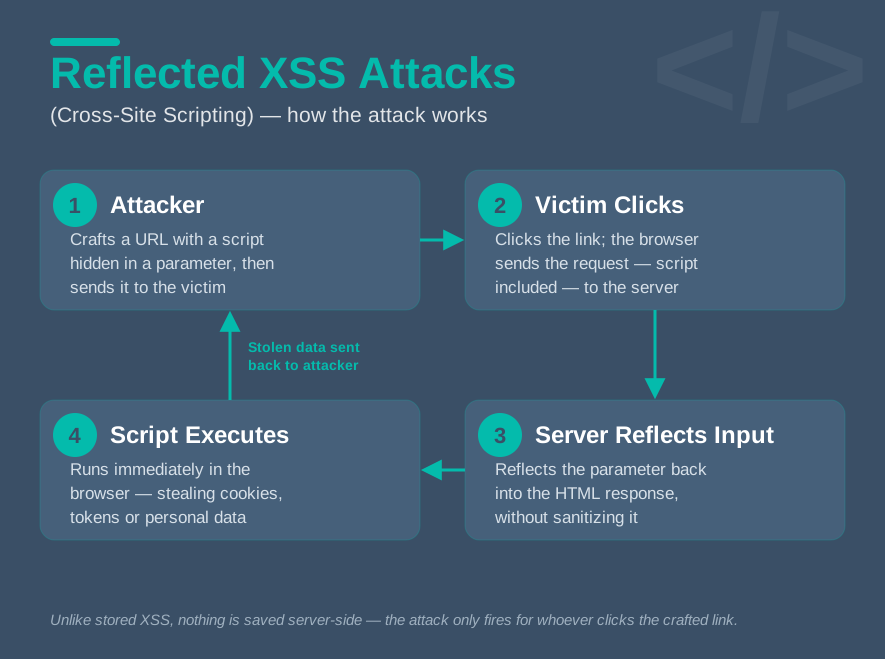
A reflected XSS occurs when data from the current request is immediately re-injected into the response or the DOM in a dangerous manner.
A search function might, for example, contain:
echo $_GET['search'];The payload is not necessarily stored. The attacker usually has to trick the victim into loading a specially crafted request, for example via a link or a redirect.
The fact that user interaction is required does not automatically mean that the severity is low. If the page is viewed by an authenticated user and exposes sensitive actions, the execution of the JavaScript may grant significant access to their session.
Stored XSS attacks
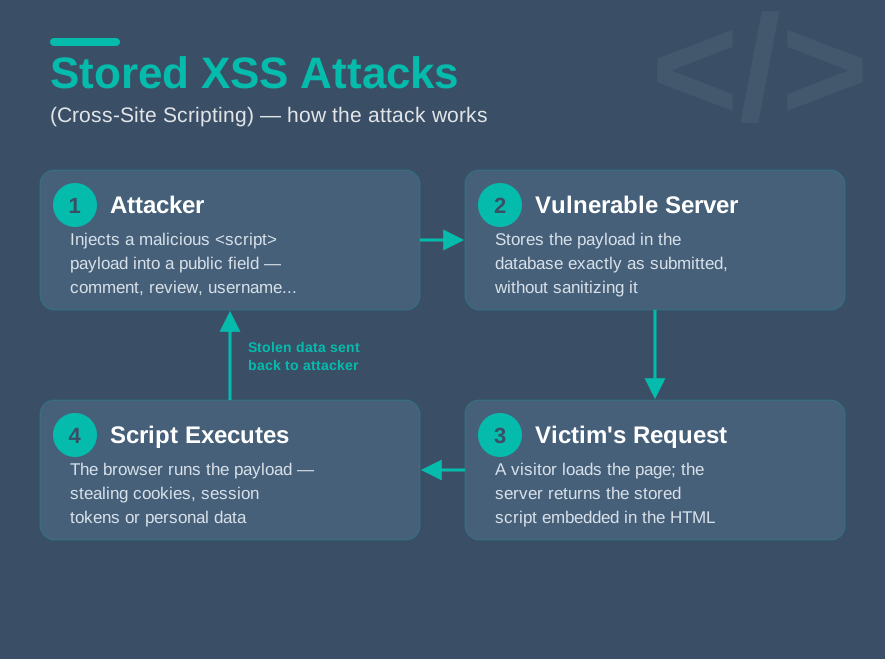
A stored XSS occurs when user-supplied data is stored and then rendered at a later stage without appropriate protection. It may be stored in a database, a file, a logging system or any other persistent mechanism.
Profile fields, comments, support tickets, collaborative tools, messaging systems and editorial content are common entry points. The danger lies in the fact that the payload becomes part of the application’s content and can be executed automatically every time the page is viewed.
A stored XSS is particularly critical when the data is displayed to privileged operators or to a large number of users. The same payload can then affect multiple victims without requiring a specific link for each one.
DOM-Based XSS attacks
A DOM-based XSS occurs when the vulnerability lies in the code executed on the browser side. The server may never receive or reflect the full payload.
For example:
document
  .getElementById('output')
  .innerHTML = location.hash;
The part of a URL that follows the # symbol is not normally sent to the server. However, the page’s JavaScript can read it and then insert it into the DOM. If the sink interprets the value as HTML, an injection can therefore occur entirely on the client-side.
Blind XSS attacks
A Blind XSS generally refers to an injection that is executed at a later stage in a context that the attacker cannot directly observe. It is frequently a Stored XSS triggered within an internal interface.
For example, a public form may record a company name, a ticket subject or a message. The user never sees this data, but it may be displayed in a CRM or back-office system used by the support team.
During a penetration test, a controlled callback mechanism can be used to confirm that an injected value has been processed within an interface that is not accessible to the auditor. This type of vulnerability is particularly significant because the victim may have elevated privileges.
Self-XSS
The term ‘Self-XSS’ refers to scenarios in which a user must execute the code themselves, for example by pasting it into the browser console following social engineering.
This scenario should not be confused with a traditional XSS vulnerability that automatically triggers code execution on another victim’s system. The risk lies primarily in social engineering.
However, it may become relevant when another weakness transforms this manual action into an exploitable chain that can be automated. The distinction must therefore be explained rather than simply classified as an XSS of the same nature as the previous ones.
DOM-Based XSS: Understanding Sources and Sinks
Modern applications execute much of their logic within the browser. To analyse a DOM XSS, one must trace the path taken by data between a potentially controlled source and a sink capable of interpreting it in a dangerous manner.
Verifiable sources
A source is a location from which JavaScript retrieves a value. URLs constitute a significant category of sources via location.search, location.hash, location.href or document.URL. document.referrer, window.name and messages received via postMessage may also be of interest, depending on the application’s trust model.
Client-side storage is not automatically a hostile source, but a value stored in localStorage, sessionStorage or IndexedDB becomes a concern if an attacker has a way of manipulating it. The same applies to data retrieved via an API: the question is not just ‘where does it come from?’, but ‘who can control its content before it reaches the browser?’.
Dangerous HTML sinks
A sink is an operation in which data is used. APIs such as innerHTML, outerHTML, insertAdjacentHTML() or document.write() instruct the browser to interpret a string as HTML.
For example:
element.innerHTML = userInput;is much riskier than:
element.textContent = userInput;when the functional requirement is simply to display text. The difference does not lie in the data itself, but in the behaviour required of the browser.
Sinks that execute or generate code
Functions that evaluate a string as JavaScript are even more sensitive. eval() and new Function() are obvious examples. Certain forms of setTimeout() or setInterval() may also evaluate a string when they are not passed a function.
The aim of remediation should generally be to eliminate the dynamic evaluation of untrusted data. Attempting to filter out all possible JavaScript syntax is a much more fragile approach.
Trace the flow between the source and the sink
Let us consider:
const fragment = location.hash.substring(1);
const decoded = decodeURIComponent(fragment);
document.getElementById('result').innerHTML = decoded;
location.hash is the source. substring() modifies the string, decodeURIComponent() transforms it again, and innerHTML is the final sink.
A proper analysis tracks the value right up to the point where it is used. In a real-world application, several functions, components and libraries may intervene between the source and the sink. It is precisely this distance that makes certain DOM XSS attacks difficult to identify using a simple HTTP scanner.
postMessage and cross-origin trust
postMessage is widely used in applications that include iframes, embedded components or SSO flows. An example of unsafe handling might look like this:
window.addEventListener('message', event => {
  result.innerHTML = event.data;
});
Two aspects need to be analysed: who can send the message, and how event.data is used.
A more robust implementation checks the origin when the trust model requires it and uses a text sink if the content does not need to be interpreted as HTML:
window.addEventListener('message', event => {
  if (event.origin !== 'https://trusted.example') {
    return;
  }

  result.textContent = event.data;
});
Checking event.origin and choosing a secure sink address two different risks. One does not replace the other.
Multiple decodings and successive representations
A value may be encoded, decoded and then re-encoded several times. In this case, a security mechanism situated upstream may analyse a representation that differs from the one that actually reaches the sink.
Double encoding is not automatically a bypass. It simply serves as a reminder that an audit must examine the exact representation of the data at each stage. The value that matters is the one ultimately consumed by the parser or the sensitive sink.
DOM clobbering and exploitation chains
DOM Clobbering exploits certain browser behaviours in which elements with id or name attributes can influence properties accessible via window or document.
This mechanism is not an XSS attack in its own right, but it can form part of a chain of attacks. For example, a script might assume that a global property contains a safe configuration value, whilst an injected HTML element alters what the code retrieves.
The inclusion of DOM Clobbering in this article serves above all as a reminder that JavaScript execution can result from an interaction between several primitives, and not solely from the direct insertion of <script>.
Mutation XSS and the complexity of HTML parsing
Why HTML sanitisation is complex
When an application wishes to allow rich HTML, full encoding is no longer compatible with the functionality: it would also convert legitimate tags into text. It is therefore necessary to allow certain structures and eliminate others.
The problem is that HTML is not a string that can be interpreted in a straightforward manner. The browser parses the document, corrects certain structures, applies different rules depending on the namespaces, and may produce a DOM that differs from the initial textual representation.
This complexity makes hand-coded sanitisers particularly risky. A regular expression that removes <script> does not understand either the structure of the document or the many ways in which active behaviour can be achieved.
mXSS: when the DOM changes after sanitisation
Mutation XSS (mXSS) exploits differences between the representation analysed by a sanitisation mechanism and that obtained following a further phase of parsing, serialisation or DOM mutation.
The key point is not to store a specific payload. It is important to understand that content may be considered safe in one state but can be interpreted differently following a transformation by the browser or a library.
This justifies the use of specialised and actively maintained libraries, as well as paying particular attention to the code executed after sanitisation. A sanitised value that is then concatenated with new, untrusted data can, of course, become dangerous again.
How Do Attackers Exploit XSS Vulnerabilities?
An alert() dialogue box confirms the presence of an XSS vulnerability. The actual impact must be assessed based on the compromised browser, the victim’s session and the features to which they have access.
Act within the victim’s authenticated session
One of the most significant attack vectors involves directly exploiting the victim’s session. Historically, demonstrations have focused on stealing cookies via document.cookie. The HttpOnly attribute prevents JavaScript from directly reading the relevant cookie, but it does not prevent XSS.
A script running within the application can often send a request to an endpoint of the same origin:
fetch('/api/account/details', {
  credentials: 'include'
});
Where the session relies on cookies associated with that request, the browser can include them without the script needing to know their values.
An attacker may therefore sometimes view data or trigger actions from the authenticated browser without stealing the session token.
Compromise an administration interface
The severity increases significantly when an injection can be triggered by an administrator. A classic example involves injecting data into a ticket, a message or a customer record that will subsequently be displayed in a back-office system.
The JavaScript then runs within the privileged user’s context. Depending on the features available in the interface, it may potentially access additional data, create an account, modify permissions or call administrative endpoints.
The impact should not be extrapolated without evidence. During a penetration test, it is preferable to demonstrate a controlled action on a test object or account rather than carrying out destructive operations.
Theft of client-side data
An XSS attack can read data present in the DOM and, depending on the storage mechanisms, certain values stored in localStorage, sessionStorage or IndexedDB. It can also access JavaScript objects exposed on the page.
This capability becomes particularly sensitive when an application stores an access token in a location accessible to the origin’s JavaScript. Unlike an HttpOnly cookie, this token can then be read directly by the injected script.
However, the risk must be assessed in terms of scopes, validity period, rotation, revocation and server-side restrictions. The mere fact that a token is a JWT is not in itself the main problem.
Phishing with a legitimate source
An injected script can alter the interface displayed to the user: add a form, hide a message, replace a content area or display a re-authentication prompt.
This scenario is particularly convincing because the user remains on the legitimate domain. The usual signs of phishing, such as an unfamiliar domain name, are partially masked. XSS therefore turns the compromised application into a social engineering tool.
During an audit, non-destructive visual evidence may be sufficient to demonstrate this risk, without the need to collect actual credentials.
Keylogging and monitoring of interactions
JavaScript can register listeners for certain page events and monitor interactions with the user interface. Technically, this can be used to capture data entered into fields accessible within the same context.
The scope depends on the content actually processed by the page. In a sensitive back-office system, this may involve authentication details, business data or privileged commands. The assessment must be based on the actual functionality present rather than on a generic assumption.
XSS and CSRF protection
An XSS attack often renders CSRF protections largely ineffective because the malicious code is already running within the trusted origin. It is important to be precise, however: the browser does not automatically add an arbitrary CSRF token or a custom authentication header to every request.
The injected script can, however, replicate the legitimate behaviour of the application: reading a token present in the DOM when it is accessible, calling an endpoint that provides it, or triggering the same JavaScript function as the normal interface.
XSS therefore does not cryptographically ‘break’ the CSRF mechanism; rather, it circumvents its key security assumption, namely that code executed within the application origin is trustworthy.
XSS and JWT tokens
In a SPA (Single Page Application), a JWT token can be used as a bearer token to call an API. If this token is stored in localStorage or another area accessible to JavaScript, an XSS attack could potentially extract it and then reuse it outside the browser, depending on the server-side controls.
If, on the other hand, authentication relies on an HttpOnly cookie, direct theft of the secret can be prevented, but the script can still act within the session as long as it is running in the browser.
The assessment must therefore distinguish between the theft of the authentication secret and the misuse of the victim’s session. These two scenarios do not have the same consequences in terms of persistence and detection.
Chaining XSS with other vulnerabilities
An XSS vulnerability can become a step in a wider attack chain. For example, it may enable an attacker to access an internal feature reserved for an administrator, retrieve data required for another attack, or trigger an action that exposes a new attack surface.
The reasoning must remain practical: it is not enough simply to list every conceivable vulnerability. A relevant attack chain is one where the prerequisites are actually present in the application being tested.
Methodology for Detecting XSS Vulnerabilities During a Penetration Test
XSS search becomes far more effective when carried out as an analysis of data, contexts and sinks, rather than by randomly sending a long list of payloads.
Mapping controllable inputs
The auditor begins by identifying the data that an attacker could manipulate: GET and POST parameters, form fields, profiles, comments, tickets, messages, file names, redirection parameters, URL fragments, data sent to APIs, HTTP headers or values from third-party integrations.
It is also important to consider data that is not immediately displayed. A ‘Company’ field entered on a public portal may be reused in a CRM, an HTML invoice, an email or a back-office system. Each instance of this data represents a different security context.
Use unique markers
Before sending an active payload, a recognisable marker is often more useful:
XSS-HACKAGORA-84721The aim is to identify the value in the responses and in the DOM, to determine whether it is stored, whether it appears in several places, and what transformations it undergoes.
For persistent or blind tests, it is useful to use a different identifier for each field:
XSS-NAME-84721
XSS-COMPANY-84722
XSS-SUBJECT-84723
XSS-MESSAGE-84724
This means that a callback or a later observation can be linked precisely to the injection point.
Compare the HTTP response and the final DOM
In a traditional application, the HTML in the response and the final DOM may be similar. In a SPA, they can be very different: the server sometimes returns a simple container, after which JavaScript builds the entire interface using APIs.
The auditor must therefore examine both the raw response and the DOM after execution. Data missing from the initial HTML may subsequently appear; a harmless value in the response may also be re-read and then injected into a dangerous sink.
Identify the context precisely
The marker may appear in:
<p>XSS-HACKAGORA-84721</p>or:
<input value="XSS-HACKAGORA-84721">or:
const name = 'XSS-HACKAGORA-84721';These three scenarios require different analyses. The construction of a payload should only begin once the context has been understood.
Observe the changes
The auditor then tests the behaviour of characters that have a specific meaning in the identified context, such as <, >, «, ‘, `, `, & or /`.
The aim is not immediately to bypass a filter, but to determine what the application does. Does the character < become <? Are quotes encoded? Is a value decoded twice? Does a sanitiser remove the element or only certain attributes?
This analysis reveals the protection actually in place and often makes it possible to distinguish between correct encoding and a weak blocklist.
Build minimal evidence appropriate to the context
Once the structure is understood, the proof of concept should be as simple as possible. In an HTML context, an element containing an event handler may be sufficient. In an attribute, one must first determine whether it is possible to escape the delimiter. In JavaScript, the exact syntax of the string must be analysed.
A minimal proof makes remediation easier: it clearly shows which syntactic boundary has been crossed without obscuring the problem behind a complex payload.
How To Prevent XSS Vulnerabilities?
There is not a single security measure that applies to all situations. The most robust strategy is to maintain a strict separation between data and code, and then to choose the appropriate security measures based on the rendering context.
Encode at the time of output and according to the context
When text needs to be displayed, contextual encoding is one of the main safeguards. A value intended for the HTML body is not treated in the same way as an attribute value, a URL or a JavaScript string.
Encoding must be carried out as close as possible to the sink. Encoding data as soon as it enters the application is unreliable: it ties the value to a specific context, may cause double encoding and does not protect against future uses in other syntaxes.
Modern template engines often provide automatic escaping. It is preferable to rely on these mechanisms rather than manually recreating the transformations.
Prioritise safe sinks
Choosing the right API can eliminate much of the risk. When a string simply needs to be displayed, textContent is preferable to innerHTML:
output.textContent = userInput;Beyond this example, the aim is to use APIs that manipulate structured values rather than fragments of code or markup. createElement(), safe property assignment and the explicit construction of DOM nodes are often preferable to concatenating HTML strings.
Sanitise when HTML actually needs to be accepted
Certain features need to retain HTML: CMS, forums, rich text editors or Markdown content converted to HTML. In such cases, simple encoding would break the functionality.
A specialised, maintained sanitisation library, such as DOMPurify for compatible uses, is preferable to a home-made filter. The configuration must be tailored to the elements and attributes that are actually required.
The security of the pipeline does not end with the call to the sanitiser. The result must not subsequently be modified with untrusted content or injected into a context that the library was not designed to protect.
Validate inputs when the format is known
Validation reduces the attack surface when the expected data has a clearly defined format. A numeric identifier can be restricted to digits; a date, a colour or an enumeration value can be subject to a strict allowlist.
This measure complements output filtering but does not replace it. A free-text field cannot be made secure simply by removing a few sequences deemed suspicious.
Avoid payload blocklists
An approach such as:
input.replace('<script>', '')is fundamentally inadequate. Browsers have numerous mechanisms for enabling active behaviour without using this exact string.
The correct strategy is not to recognise every conceivable attack. It is to prevent untrusted data from being interpreted as code in the context in which it is used.
Retain frameworks’ automatic safeguards
The escape mechanisms in frameworks and template engines must remain enabled by default. APIs that return raw HTML or mark a value as safe must be few and far between, clearly identified and treated as security boundaries.
When a component receives sanitised HTML, the source of the data and the sanitisation process must be explicitly stated in the code. This practice also facilitates audits and reduces the risk of unintentional bypasses.
Content Security Policy as a defence-in-depth strategy
CSP allows you to restrict script sources and execution conditions. A modern policy can rely on nonces or hashes:
Content-Security-Policy:
  default-src 'self';
  script-src 'nonce-RANDOM_VALUE';
More advanced policies may use strict-dynamic when appropriate for the architecture. The aim is to minimise the execution of scripts that have not been explicitly authorised.
However, CSP should not be regarded as a fix for XSS. A permissive policy, an exploitable authorised source or a change in configuration may allow the exploit to be reinstated. The vulnerability must be addressed at the data flow and sink levels.
Trusted Types to reduce DOM XSS
Trusted Types provides architectural protection against the accidental use of arbitrary strings in certain sensitive DOM sinks.
In particular, a CSP policy may require the use of Trusted Types on the relevant sinks:
Content-Security-Policy: require-trusted-types-for 'script';On compatible browsers, the code must then provide Trusted Types objects rather than ordinary strings to certain APIs. The application can centralise the creation of HTML content within explicitly audited policies, for example by passing the data through a sanitiser before producing TrustedHTML.
Trusted Types does not magically make a transformation function correct. A policy that declares dangerous content to be safe remains vulnerable. Its benefit lies in reducing the number of places capable of directly feeding sensitive sinks and making these boundaries more visible in the code.
HttpOnly and minimising the impact
The HttpOnly attribute prevents JavaScript from directly reading the value of an affected cookie via document.cookie. It therefore limits certain session hijacking scenarios and should be used for authentication cookies where functionality permits.
However, it does not prevent XSS. The injected script can still operate within the authenticated browser and send requests to which the cookie automatically applies.
HttpOnly should therefore be regarded as a measure to mitigate the impact, not as a primary defence against injection.
SameSite and actual scope of protection
SameSite primarily controls the circumstances in which a cookie is sent in requests initiated from other sites. It therefore plays an important role in mitigating several CSRF scenarios.
An XSS attack is executed directly on the legitimate origin; the value of SameSite is therefore much more limited in such cases. The attribute remains useful as part of an overall session security strategy, but should not be presented as a direct defence against XSS attacks.
Isolate sensitive interfaces and sources
Architecture can also help mitigate the impact. It is not always advisable for a particularly sensitive administration interface to share the same origin as an area used to display user-controlled rich content.
Separating origins can limit the interactions permitted by the Same-Origin Policy and reduce the scope of a compromise. Whilst this measure does not replace the need to fix injection vulnerabilities, it provides a useful defence-in-depth strategy in certain risk models.
Maintain rendering and sanitisation libraries
Frameworks, Markdown parsers, WYSIWYG editors, sanitisers and components that manipulate HTML form part of the security surface. They must be inventoried and kept up to date.
An application may use a library correctly yet still be vulnerable if the version contains a known exploit or if the value is subsequently modified in a context not covered by the library’s security model.
Conclusion
XSS vulnerabilities remain significant because they exploit a central element of the relationship of trust between the user and an application: the user’s browser.
Understanding them must not be limited to the injection of a <script> tag or the theft of the document.cookie. A modern XSS attack is, above all, a problem of data flow and interpretation context. A controllable value enters the system, may pass through several components, and then reaches a point where the browser can interpret it as active content.
This approach explains why encoding must be context-dependent, why safe sinks are preferable to APIs that interpret HTML, why sanitisation is only necessary when rich content actually needs to be preserved, and why frameworks’ automatic protections must not be deliberately disabled without additional checks.
From a penetration testing perspective, the same logic applies in reverse. An effective methodology begins by identifying controllable data and its outputs, then analyses the transformations and sinks before constructing a suitable proof. This method is particularly important for DOM XSS, persistent injections into internal interfaces, and complex JavaScript applications.
Finally, the severity must always be considered within its functional context: what triggers the payload, what data is accessible, what actions can be performed, and which session model is used. It is this combination of understanding the browser, analysing data flows and assessing privileges that enables both the accurate detection of XSS attacks and their long-term prevention.